3 Ways ArmorCode Customers Automated PHP2Shell Response

It’s been a week since PHP2Shell hit, and the lessons are already clear. Three ArmorCode customers, a Fortune 500 financial services company, a global medical device maker, and a global equipment manufacturer, each took a different route to the same result: they knew where they stood within minutes of the disclosure, not days. Here’s what they did, and what every team can take from it for the next zero-day.
First, a quick recap. On October 20, 2026, identifiers for two critical PHP vulnerabilities, CVE-2026-109618 and CVE-2026-109619, leaked online before coordinated disclosure. Both carry a CVSS v4.0 score of 9.2 and can allow unauthenticated remote code execution. Researchers are calling the pair PHP2Shell. PHP shipped emergency releases on October 21. Cloudflare reported early exploit attempts, and some organizations took services offline as a precaution.
The patch exists. The harder question is where to apply it.
Why PHP2Shell is a scoping problem first
Nearly every PHP version back to PHP 5.4 is affected. These flaws sit in the PHP core, below application code, so updating a plugin or framework won’t close them. Any PHP installation serving web requests is exposed, and PHP hides in places that rarely show up in a package inventory: CMS stacks, control panels, vendor appliances, container images, and bundled php.exe files. Linux distributions also shipped the fix under old-looking version numbers, so a simple version check can mislead you.
Phil Venables, in his recent post on the surge in vulnerabilities, put the underlying problem plainly:
“Remediating vulnerabilities is more than finding and fixing the vulnerability in a code base. That’s becoming the ‘easy’ bit. The hard bit for the vast majority of enterprises is actually getting the update actually deployed to the places that will face the exposure.”
PHP2Shell is a textbook case. PHP shipped its fix on October 21. Everything that remained was the hard bit.
That leaves security teams with three questions:
- Where are we running PHP?
- Which systems are exposed, starting with internet-facing and mod_php hosts?
- And who owns the fix, and did it work?
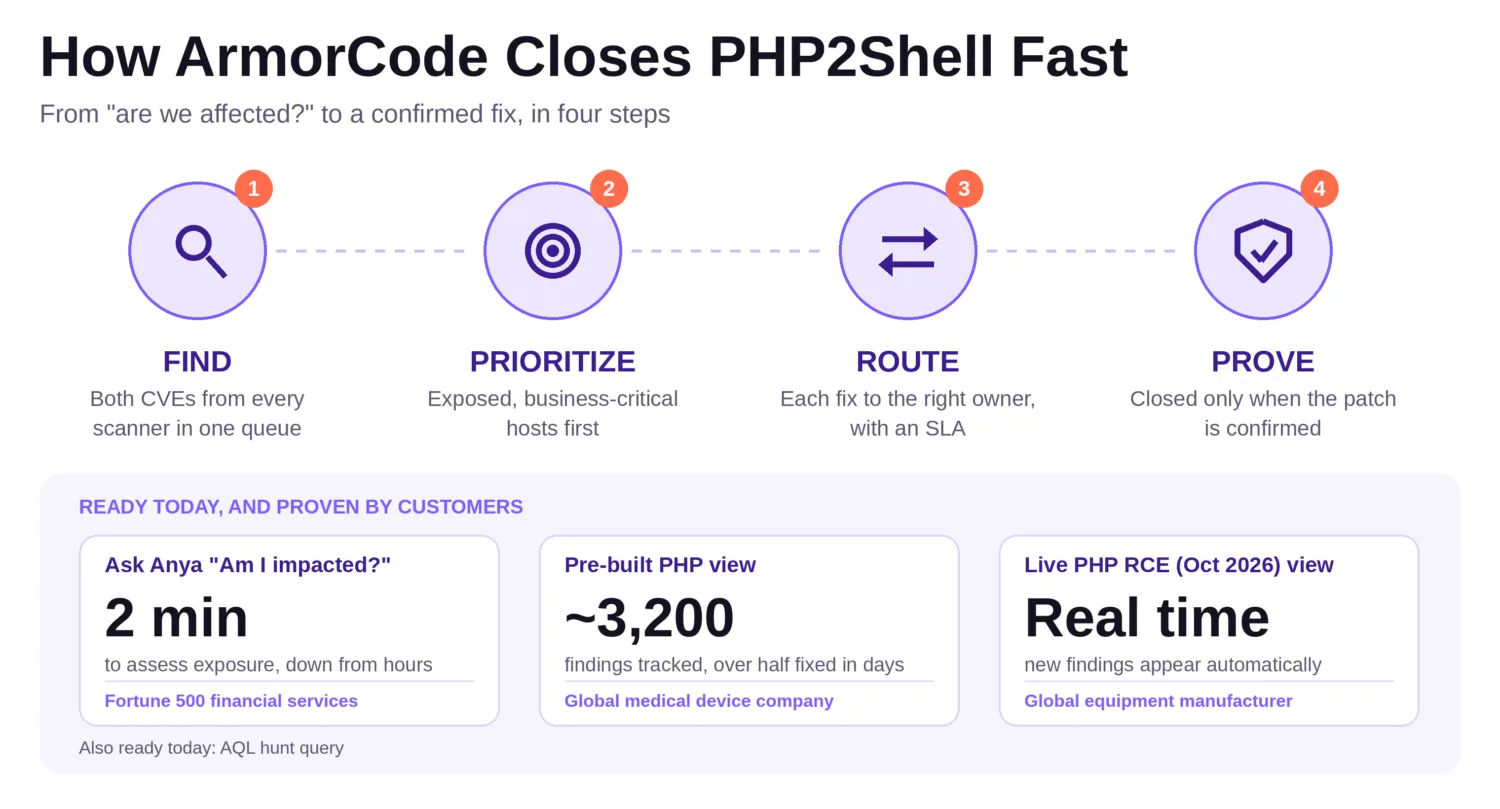
ArmorCode customers worked through those questions as a four-step loop: find every affected finding in one queue, prioritize the exposed and business-critical hosts, route each fix to the right owner with an SLA, and prove it by closing only when the patch is confirmed.
Here’s how three customers put it to work.
Lesson 1: Unify your scanner data, then ask one question
A Fortune 500 global financial services company needed to know right away whether PHP2Shell exposed them. Without ArmorCode, four or five people would have spent hours or days running scanners to look for PHP across the environment.
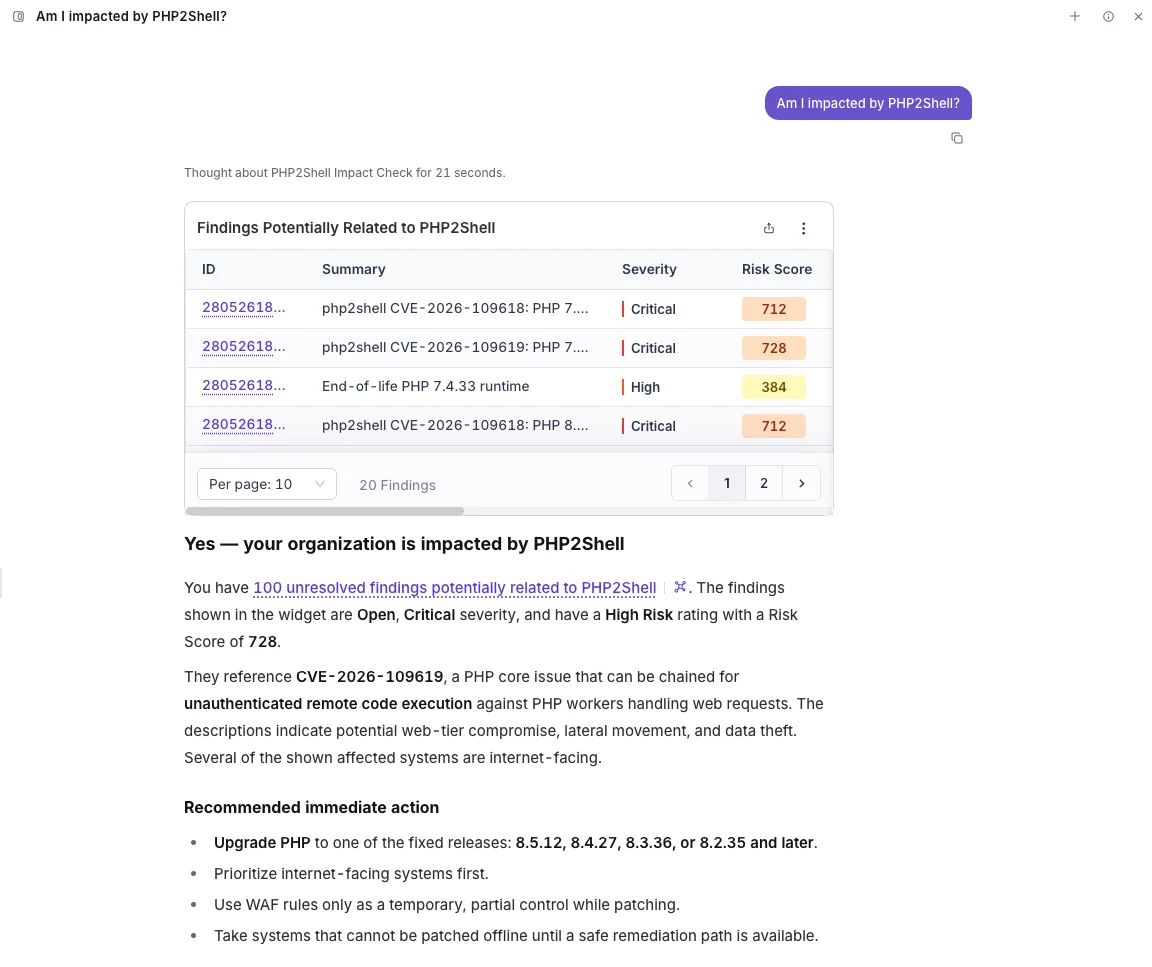
Instead, their scanner output was already unified in ArmorCode. The team asked Anya, ArmorCode’s AI security champion, one natural-language question and had answers in minutes. No new scans. No war room. Impact assessment dropped from several hours to 2 minutes, and a many-person effort became a single query.
“When PHP2Shell hit, I didn’t need a war room. I asked Anya one question and had our exposure in minutes. The scanner data was already in ArmorCode, so there was nothing new to run.”
VP of Risk, Threat and Vulnerability Management, Fortune 500 global financial services company
2. Track every affected finding from one pre-built view
A global medical device company’s Threat and Vulnerability Management team needed fast, accurate numbers for their CISO, without pulling data from each scanner separately.
ArmorCode’s pre-built PHP view gave them one place to track every affected finding, including those pulled in from Wiz. They identified about 3,200 findings and remediated more than half within days. CISO reporting now runs straight from ArmorCode.
“Yeah, we’re working off of ArmorCode’s PHP vulnerability view.”
Security Engineer, global medical device company
Lesson 2: Give leadership one view of exposure
A global agricultural and construction equipment manufacturer’s Application Security team wanted to know quickly whether they were exposed, without building queries or hunting across tools.
ArmorCode set up a dedicated PHP RCE view in their tenant. It filters all findings down to the relevant ones on a single page and updates in real time, so new PHP RCE findings appear automatically. The team started assessing exposure right away, with no searches to re-run.
“Thank you for the quick setup of the pre-built view. This will make it much easier for our team to quickly review the relevant findings and assess any potential exposure. Appreciate the proactive support and quick turnaround.”
Security Architect, global agricultural and construction equipment manufacturer
Lesson 3: Let a live view do the watching
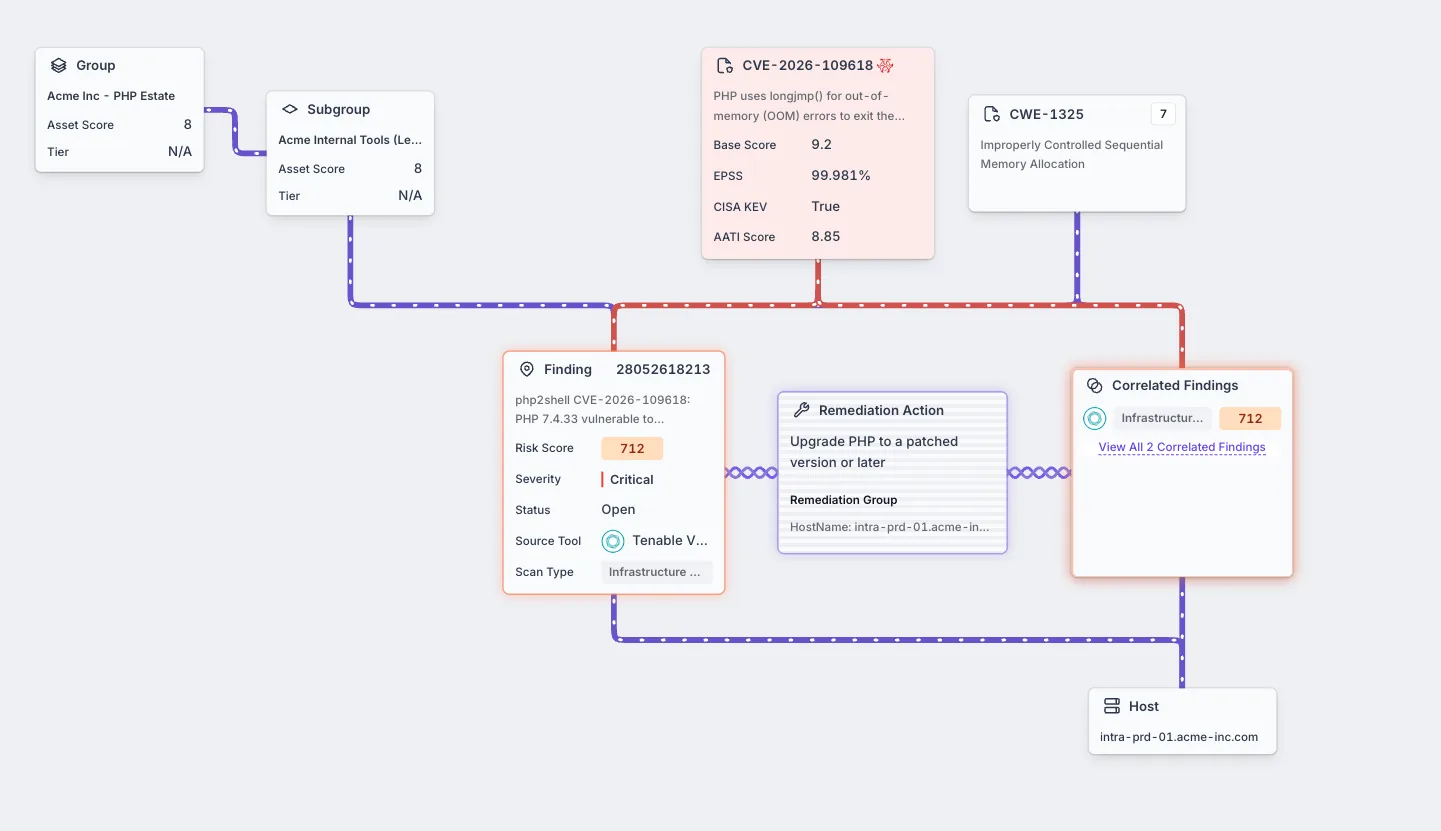
Knowing you’re exposed is step one. The harder work is deciding what to fix first, handing it to the right owner, and showing it’s done. This is where the Correlated Finding Graph comes in.
In the example below, a single PHP 7.4.33 finding ties together everything a team needs on one screen: the asset group and subgroup, the CVE and its risk signals, the finding itself, the remediation action, and the affected host. CVE-2026-109618 carries a base score of 9.2, an EPSS of 99.981%, a CISA KEV listing, and an AATI score of 8.85. The finding lands at a risk score of 712, and the remediation action is spelled out: upgrade PHP to a patched version or later.
Be ready before the next Zero-day
Each team started from the same place: scanner data already unified in one platform. That’s what made the difference. When a disclosure lands, you shouldn’t have to start by finding out what you have. Whether the answer came from a question to Anya, a pre-built view fed by Wiz, or a live view that updates itself, the work began with exposure already in hand rather than a scramble to collect it.
The next zero-day will look different from PHP2Shell, but the questions will be the same. Where is it running, what’s exposed, who owns the fix, and did it work? Teams that can answer those in minutes spend their time fixing, not searching.
Get started today
If you’re an ArmorCode customer, ask Anya “Am I impacted by PHP2Shell?” or open the “PHP RCE (Oct 2026)” view in the platform. Security engineers can also run the AQL hunt query to catch indirect exposure.
Not a customer yet? Take the PHP2Shell product tour to see how Anya, the pre-built view and AQL find exposure across your scanner data. We also offer a free readiness assessment that applies this same approach to your environment. Our security team’s full technical write-up is available at armorcode.com/blog/php2shell-rce.
Want to see how this works in your environment? Request a demo and ask us about Anya and pre-built exposure views.